
Area 1. Reservoir and well navigator
In this area you add/delete reservoirs and wells, and also link wells to reservoirs.
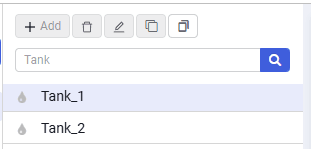 Select image to enlarge
Contains the following elements:
Add 
adds a new object — a well or a reservoir, depending on the object selected in the drop-down list;
Delete 
Deletes the selected object — a well or a reservoir, depending on the object selected in the drop-down list;
Rename 
Renames the selected object — a well or a reservoir, depending on the object selected in the drop-down list;
Clone selected tank 
Creates a copy of the selected reservoir;
Search box
Changes automatically when the object in the drop-down list is changed (reservoir search or well search).
Each reservoir model has an icon that shows its type:
 – Oil;
 – Gas;
 – Water.
When you select the "Well" object type in the drop-down list to the right of the "Reservoir model" heading, the workspace is supplemented with the following elements:
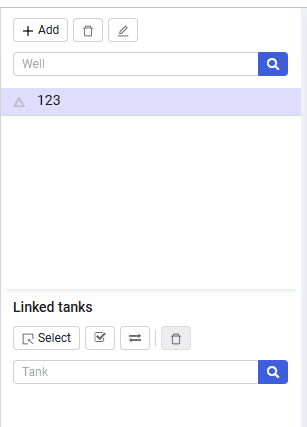 Select image to enlarge
Search boxes
Change automatically when the object in the drop-down list is changed (reservoir search or well search);
Select
The button is used to link wells to reservoirs;