
Control
 Select image to enlarge
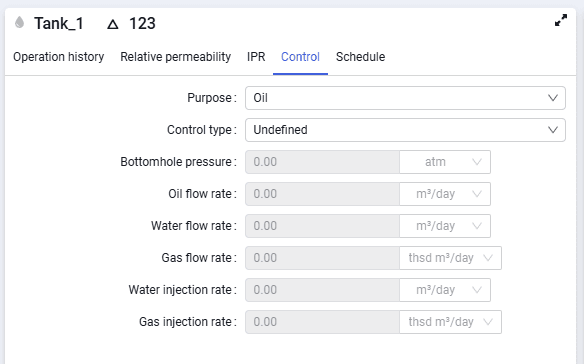
The "Control" tab contains the following fields:
- Purpose
In the drop-down list you can select one of the values — Undefined, Oil, Injection, Gas, Gas injection; - Control type
In the drop-down list you can select one of the values — Undefined, bottomhole pressure, liquid flow rate, oil flow rate, water flow rate, gas flow rate, water injection rate, gas injection rate; - Bottomhole pressure
To enter a bottomhole pressure constraint. You can paste a single value from the clipboard, type it from the keyboard, or set the value using the spinner in the cell while editing; - Oil flow rate
To enter an oil flow rate constraint. You can paste a single value from the clipboard, type it from the keyboard, or set the value using the spinner in the cell while editing; - Water flow rate
You can paste a single value from the clipboard, type it from the keyboard, or set the value using the spinner in the cell while editing; - Gas flow rate
You can paste a single value from the clipboard, type it from the keyboard, or set the value using the spinner in the cell while editing; - Water injection rate
You can paste a single value from the clipboard, type it from the keyboard, or set the value using the spinner in the cell while editing; - Gas injection rate
You can paste a single value from the clipboard, type it from the keyboard, or set the value using the spinner in the cell while editing.