
nv.AIM PIPE home page
The nv.AIM PIPE module home page consists of two areas — the model tree and the model workspace.
The model tree contains the following controls:
Hide/show model tree (  )
)
Used to increase the workspace for working with models;
Create new model (  )
)
Used to create new models in the project;
Clone selected model (  )
)
The button is inactive by default; to clone a model, select a model in the tree. This function is used to create, configure, and run calculations on a model when changes must not or cannot be made to the original model;
Delete selected model (  )
)
The button is inactive by default; to delete a model, select a model in the tree;
Rename selected model (  )
)
The button is inactive by default; to rename a model, select a model in the tree.
The model tree displays the components of the open model — production (oil), injection (water), production (gas), injection (gas), injection (gas lift). By default, the component list is collapsed. The  button expands the list.
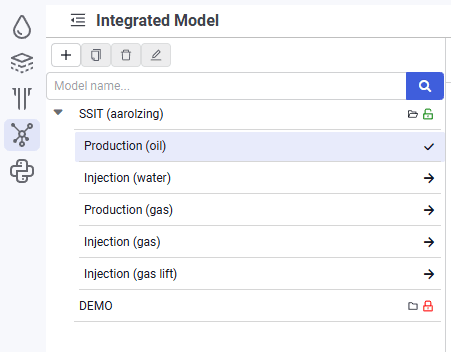 Select image to enlarge
The following controls are available for each model:
Load model (  )
)
Clicking loads the model to view all model properties and parameters. Model editing is not available;
Enter edit mode (  )
)
Clicking opens access to edit models;
Exit edit mode (  )
)
Available only in edit mode.
In edit mode, the user name of the person currently editing is displayed in the row with the model. While a model is being edited, other users can open the model only in read mode and cannot run calculations or make any changes to the model.
Exiting edit mode is accompanied by a pop-up window:
- "Save" — all model changes are saved;
- "Don't save" — changes are not saved; the model remains in the state it was in before editing;
- "Cancel" — exiting edit mode is not performed.