
Schedule
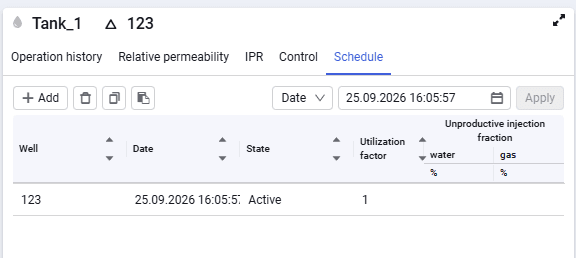 Select image to enlarge
The "Schedule" tab consists of the following elements:
Add
Add new rows to enter the schedule.
Delete (  )
)
Delete the selected schedule row.
Drop-down list with parameters (  )
)
The following parameters are available: date, well state, well utilization factor.
Parameter input window (  Select image to enlarge )
A field for entering the corresponding parameters.
Apply
To apply changes to the selected schedule row/rows. You can apply parameters in bulk by selecting two or more rows.
The table part contains the following data:
- well. Name of the selected well for entering schedules;
- date. Date for which the well state is specified. Editable field — drop-down calendar with date and time;
- state. Editable field — drop-down list. Contains the following values — "Undefined", "Active", "Shut-in";
- utilization factor;
- unproductive injection fraction for water and gas.