
User Settings
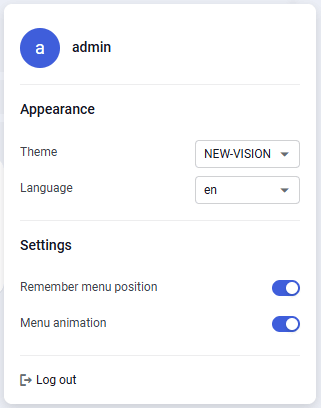
The "User settings" window lets you configure nv.AIM interface parameters that are individual for each user and are applied every time the user signs in to the system.
 Select image to enlarge
In the "User settings" window you can configure the following parameters:
- Theme – interface color theme (SAP, TERRALINK, ARIA, OIS themes are available);
- Language – interface language (Russian, English, and Azerbaijani are available);
- Remember menu state – if the check box is selected, when you reopen the main menu during the current session, the last selected module and its application list are displayed. If the check box is cleared, the menu always opens in the initial state with all application lists collapsed;
- Menu animation – if the check box is selected, the animated navigation mode of the nv.AIM main menu is enabled.
Settings are applied automatically, the page reloads.