
ESP Design
This tab is used to design an ESP based on the specified well parameters.
The tab is available only for oil wells with the ESP lift method.
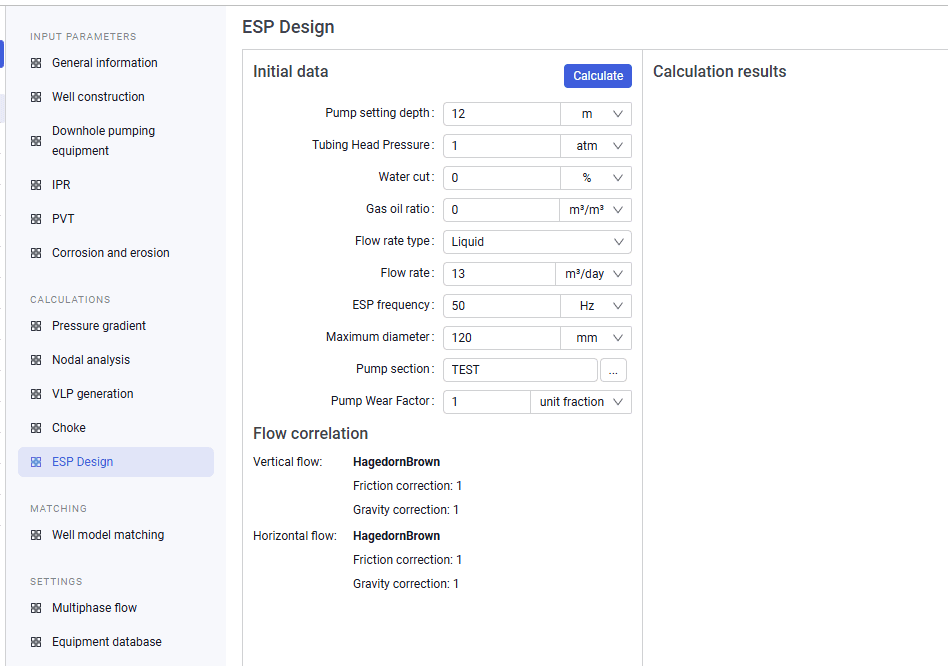 Select image to enlarge
The tab consists of the following panes:
- Source Data;
- Calculation results.
Source Data
This pane is used to enter source data for the calculation. The Calculate button starts the ESP design calculation.
The pane also contains a set of configurable calculation parameters, such as: pump setting depth, tubing head pressure, water cut, gas oil ratio, flow rate type, flow rate, ESP frequency, maximum diameter, pump section (selected from the catalog), and Pump Wear Factor.
Below the input fields, the vertical and horizontal flow characteristics and the names of the current multiphase flow correlations are displayed.
Calculation results
This pane shows the stage calculation result for the specified parameters.