
Entering general tank data
To enter general tank data, perform the following actions.
1.In the object Navigator, select a tank.
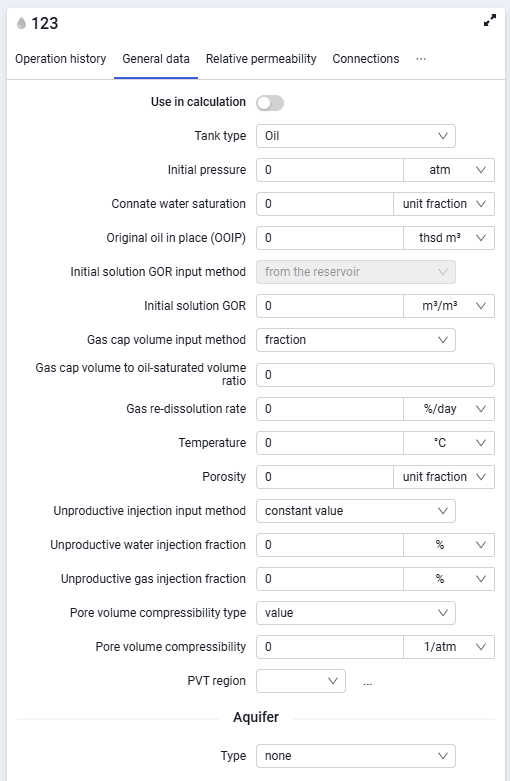
2.On the "General data" tab, configure the following parameters:
- tank type. Select a value from the drop-down list — oil, gas, or water;
- initial reservoir pressure;
- connate water saturation;
- original oil in place;
- initial solution GOR;
- gas re-dissolution rate;
- initial gas cap volume to oil in place ratio;
- porosity;
- unproductive injection fraction;
- pore volume compressibility;
- PVT region. Select a previously created or imported PVT model from the drop-down list.
 Select image to enlarge
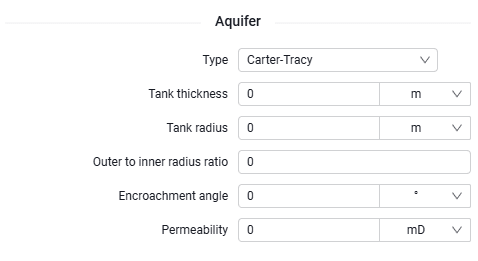
3.If needed, you can add an aquifer:
- type. Select one of the options from the drop-down list;
- geometry;
- tank thickness;
- tank radius;
- encroachment angle;
- permeability;
- outer to inner radius ratio.
 Select image to enlarge