
IPR
 Select image to enlarge
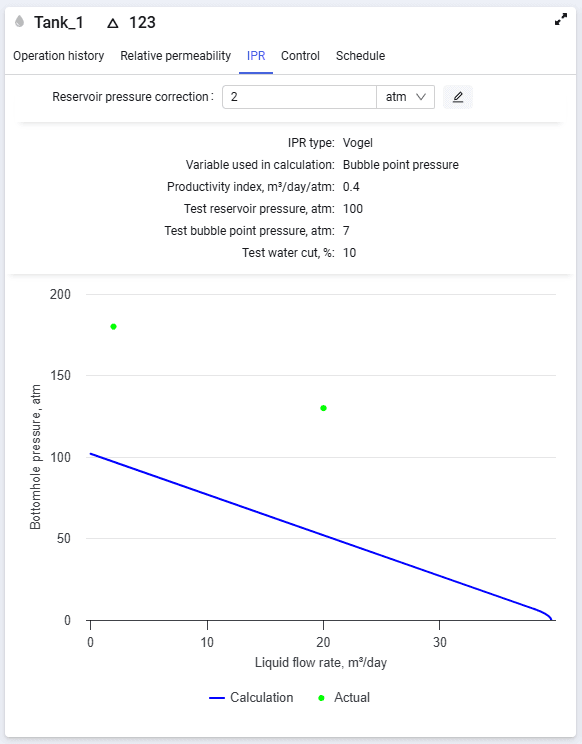
The IPR tab contains the following elements:
- Open inflow model editor (
 ) – inflow model editor. To make changes to the selected model;
 - Reservoir pressure correlation – well reservoir pressure correction relative to the weighted-average reservoir pressure;
- Main inflow model parameters in the upper part of the tab.
- Plot of bottomhole pressure versus liquid flow rate in the lower part of the tab.
The inflow model editor has 4 areas.
The control panel contains the following elements:
- Name of the selected completion;
- Match pressures – automated matching of reservoir pressure to well test data;
- Match coefficients – automated matching of the productivity coefficient to well test data.
Input parameters contain the following fields:
- IPR type – drop-down list. The following types are available: for oil wells – Vogel, No flow boundaries, Transverse vertical fractures; for gas wells – Forchheimer, C and N, Forchheimer with pseudo pressure. The set of parameters differs for each type;
- set of input parameters depending on the selected IPR type.
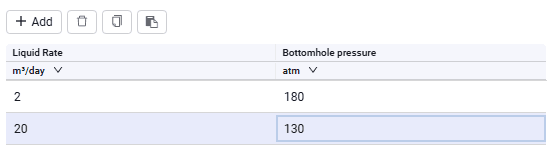
The "Well test data" area contains the following elements.
 – Add. Adding new rows for entering data;
 – Delete. Deleting the selected row;
 – copy to clipboard. Used to copy and save data in external tables;
 – paste from clipboard. Used to paste values from external tables. For correct paste, select the required cell in the table; the entire copied value range is pasted starting from the selected cell.
The table contains the following data:
- liquid flow rate. You can paste a single value from the clipboard, type it from the keyboard, or set the value using the spinner in the cell while editing;
- bottomhole pressure. You can paste a single value from the clipboard, type it from the keyboard, or set the value using the spinner in the cell while editing.
 Select image to enlarge
By default, calculated and actual values are displayed on the plot in the right part of the screen.