
Relative Permeability Matching
 Select image to enlarge
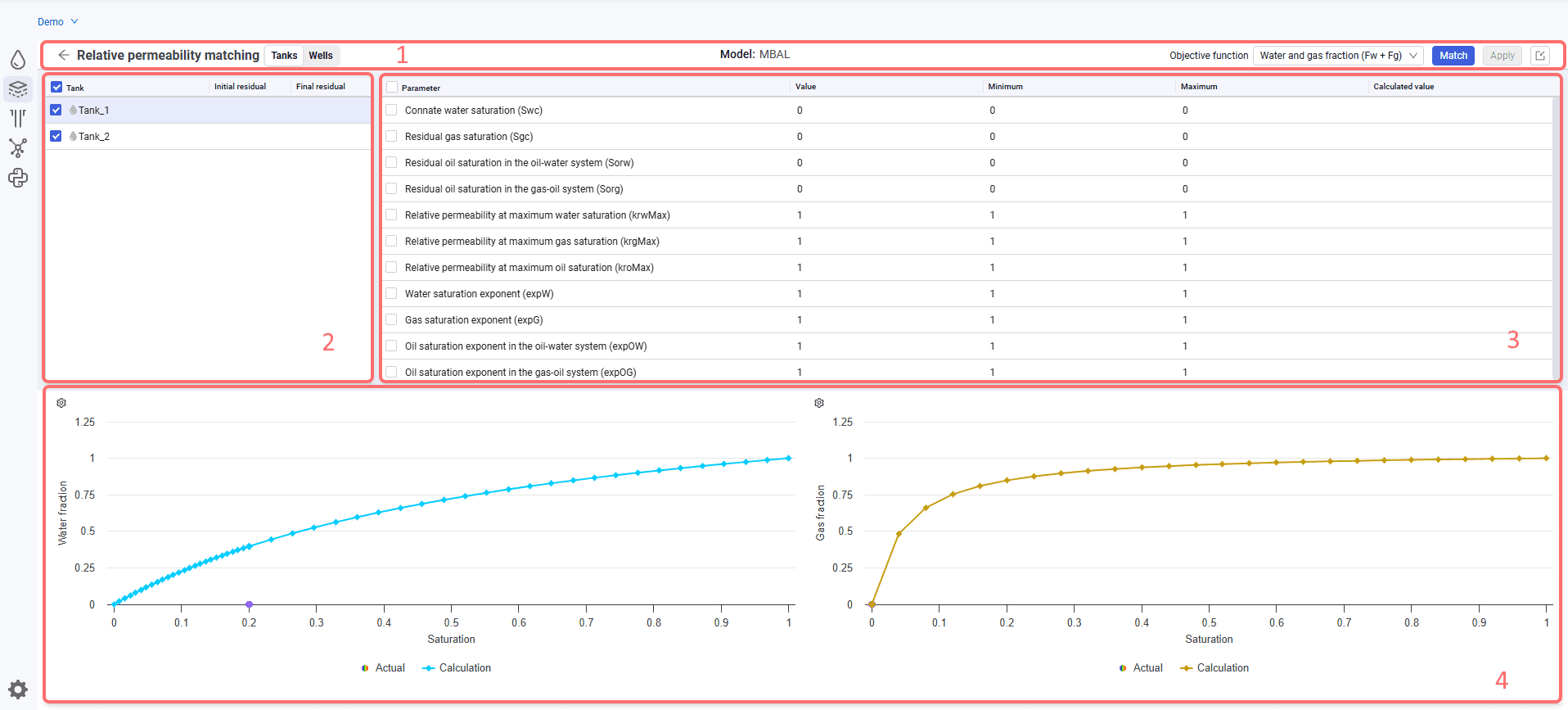
This functionality is available only when relative permeability is specified using Corey correlations. The screen form contains 4 areas.
Area 1.
Contains the following elements:
 – back. To return to the reservoir model;
- Tanks / Wells – tanks and wells are available for matching;
- Name of the selected model in the model tree;
- Objective function. Drop-down list for selecting the function. The following functions are available: water fraction, gas fraction, water and gas fraction;
- Match. To start matching;
- Apply. To apply the parameters obtained during matching. Active after matching is completed.
Area 2.
The table contains the following parameters:
- check box to select a reservoir or well for matching;
- reservoir or well name. By default, all reservoirs or wells in the selected model are displayed;
- Initial residual;
- Final residual.
Area 3.
The table contains the following parameters:
- check box to select a parameter for matching;
- parameter for matching. All available relative permeability parameters are displayed;
- Value. Displays the parameter value from the Relative permeability tab;
- Minimum. Minimum value for matching; matching is not performed below this value;
- Maximum. Maximum value for matching; matching is not performed above this value;
- Calculated value. The value obtained during matching.
Area 4.
Relative permeability plots.
The following elements are available on the plot:
 – Settings. To change the axis parameters. For water, the Y axis options are water fraction and water cut; the X axis options are saturation and date. By default, water fraction and saturation are selected. For gas, the Y axis options are gas fraction and gas oil ratio; the X axis options are saturation and date. By default, gas fraction and saturation are selected;
- Legend in the bottom part of the pane. By default, actual, calculation, and matching are always displayed. Click any of the parameters to hide it on the plot;
- Reset. To reset the plot zoom. If required, you can zoom the plot by selecting the required area with the right mouse button.